Expressions: combining tags
Any tag that only shows a value (not one that sends a command) can be an Expression instead of a single tag. Choose Expression… at the top of the tag list.
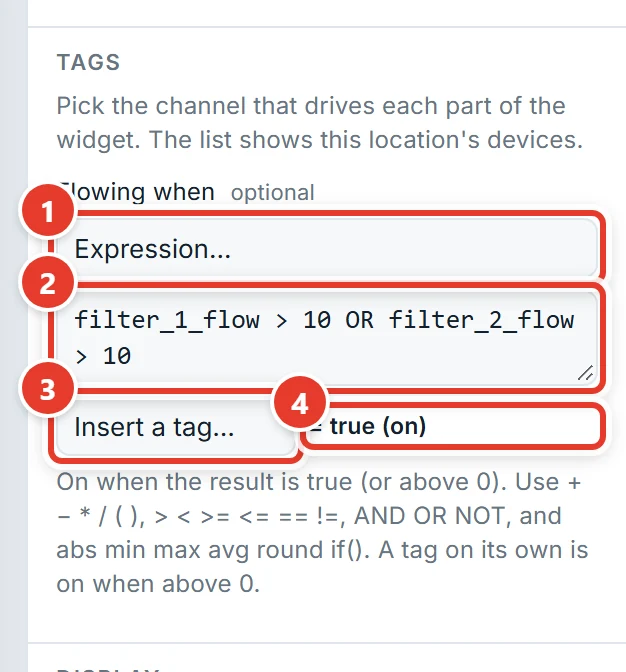
- Expression… in the tag list.
- The expression. Here the header flows when either filter is sending more than 10 gpm.
- Insert a tag… puts a channel's name in at the cursor, so you don't have to remember how it's spelled.
- The result, worked out as you type, or what's wrong with the expression (for example No channel called "filt3_flow" at this location).
Expressions work for on/off tags (a pipe's Flowing when, an LED, a pump's Running) and for values (a text box, a gauge, a flow meter's reading, a trend pen):
| You want | Expression |
|---|---|
| The header flows when both filters are sending water | filter_1_flow > 10 AND filter_2_flow > 10 |
| ...when either one is | filter_1_flow > 10 OR filter_2_flow > 10 |
| A light that's on when any pump runs | pump_1_running OR pump_2_running OR pump_3_running |
| A light that's on when the filter is offline | NOT filter_1_in_service |
| The total flow of two meters | filter_1_flow + filter_2_flow |
| A level in inches from a level in feet | clearwell_level * 12 |
| A scaled value | tag1 + tag2 / (10 * tag3) |
| The larger of two pressures | max(discharge_pressure, header_pressure) |
Writing tags
Use the channel's name in lower case with spaces as _: Filter 1 Flow is filter_1_flow. If two
devices have a channel with the same name, put the device first, filter_gallery.filter_1_flow; the
error message tells you when you need to. [Device / Channel] in square brackets works for any name.
What you can use
| Arithmetic | + - * / % and ( ) |
| Comparisons | > < >= <= == (or =) != (or <>) |
| Logic | AND OR NOT |
| Values | numbers, true / false, on / off |
| Functions | abs min max avg round(value, decimals) floor ceil sqrt if(test, then, else) |
You can also write && for AND, two vertical bars for OR, and ! for NOT.
A tag on its own counts as on when it's above 0 and off at 0, so pump_1_running alone is the
same as pump_1_running > 0. If a tag in the expression has no reading yet, the result shows ––.
Note
Expressions are worked out on the screen of whoever has the HMI open, so they're for what the HMI shows. They don't drive alerts, and a trend pen with an expression starts plotting when the HMI is opened. Commands and setpoints always need a single, writable channel.
Any or all of several tags
For simple cases there's also Several tags (any / all of them)…: pick the tags and whether any or all of them must be on.